Inbound call routing
Route inbound calls to an AI voice agent or your team while calls and texts stay on one CRM contact.
One caller, one contact
Beam uses the caller's phone number as the shared identity. When the same person calls and texts, both activities stay on one Beam conversation and resolve to the same CRM contact.
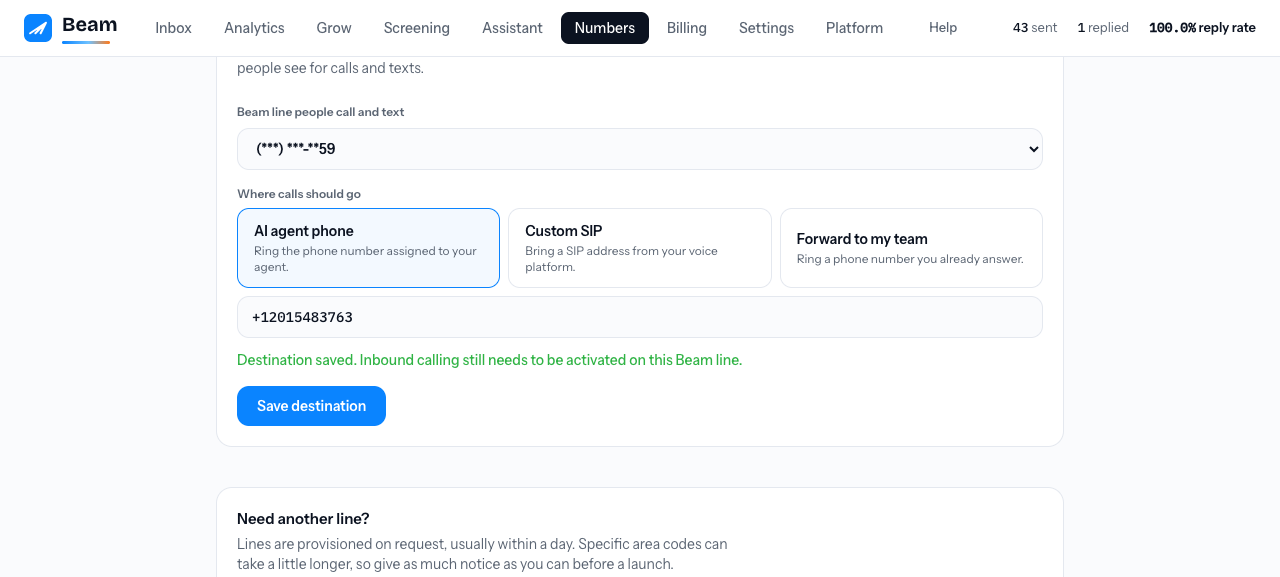
Set up call routing
Finish workspace activation
Call routing stays unavailable until your workspace is active and a Beam messaging line has been assigned by an operator.
Open Numbers
Open Inbound call routing for the assigned Beam line. Beam does not ask you for a forwarding number or phone-provider credentials in this workspace.
Copy the RizzDial Inbound URL
In RizzDial, go to AI Agents, open the three-dot menu beside the correct agent, choose Endpoints, select Inbound, and choose Copy URL. Do not use the Outbound URL.
Paste and connect
Paste the copied Inbound URL into that Beam line's Inbound receptionist endpoint field and choose Connect. Treat the URL as a secret: never paste it into chat, notes, or a spreadsheet.
Configure the shared ingress once
Your operator connects the shared inbound line to Beam. The forwarding system must include the original public-line identity with every call so Beam can select the right receptionist.
Keep call behavior in the receptionist
Transfers, appointment booking, and fallback behavior stay in the receptionist's own settings. Beam selects which receptionist handles the call; it does not override the receptionist's conversation logic.
Place a real test call
Setup is complete only when the selected receptionist answers, the call appears on the same contact as that caller's texts, and Beam records the final outcome.
What Beam records
- The caller and inbound line
- Which inbound receptionist was selected for the public line, without displaying its saved connection URL
- Connected, completed, busy, no answer, failed, or canceled outcomes
- Call time and duration when available
- The matching Beam conversation and CRM contact