The Inbox
Every conversation across every number, in one place your team can answer.
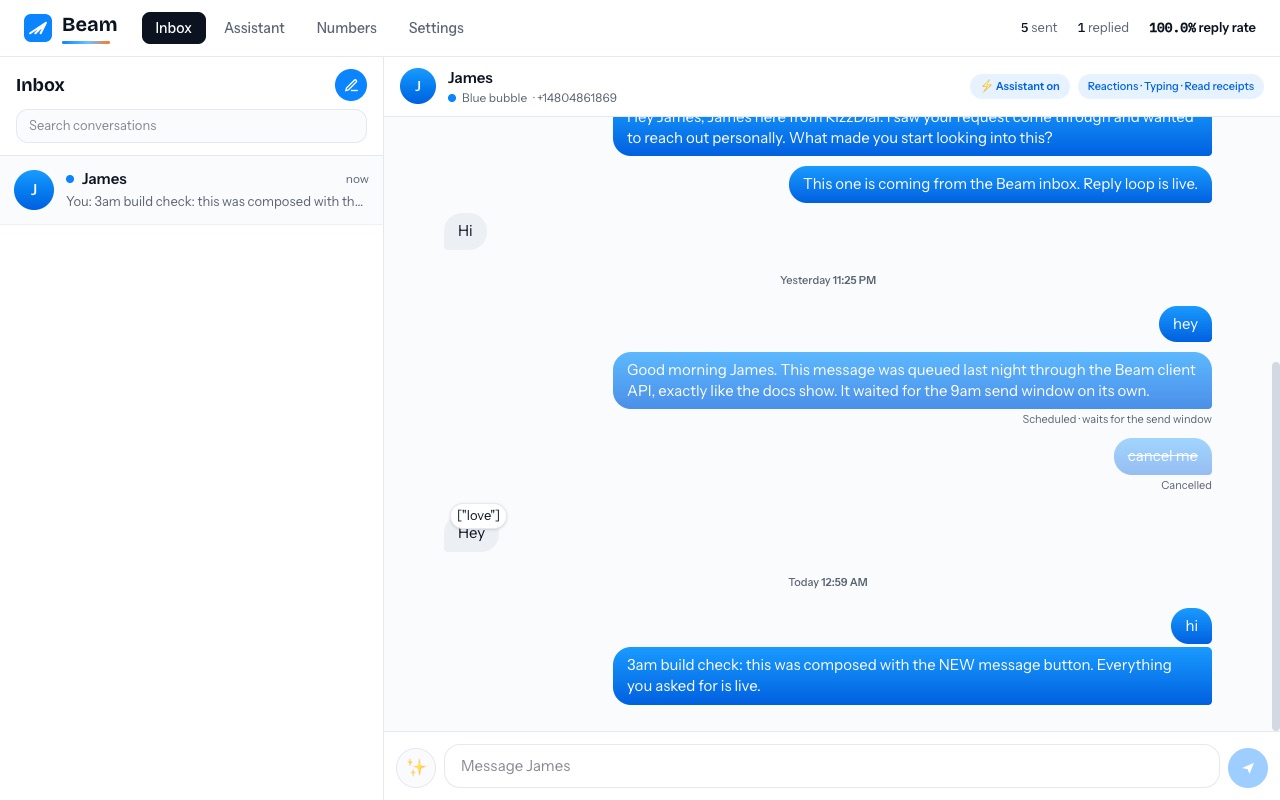
Threads
The left panel lists every conversation, newest activity first. A channel badge identifies email, blue messaging, SMS/MMS, or calls. Email threads retain their subject and recipients. Unread counts stay until someone on your team opens the thread.
Reading and replying
Open a thread to see its full history, delivery state, attachments, notes, assignment, provider events, and attributable assistant or human actions. Email compose includes recipients, subject, draft state, and reply threading.
The human touch, built in
- Typing indicator. While you type a reply to a blue-bubble contact, they see the real typing bubbles on their phone.
- Read receipts. Opening a thread with new messages sends a real read receipt. The lead sees "Read", exactly like texting a friend.
- Reactions. Hover any of their messages and tap a reaction. A real tapback lands on their message. See Reactions, typing and read receipts.
Photos and attachments
Photos a lead sends appear right in the thread. Click to open the full size.
Opt-outs
If a contact replies STOP, the thread locks: Beam marks them opted out and the composer is disabled for that contact. This is automatic and required by law. See Compliance.
Stats that matter
The header shows sent, replied, and reply rate. Reply rate is the one number that predicts everything else: revenue and number health both follow it. Above 20% on warm leads is strong.